On 2 November 2026 the FCC granted certification to a device called the XTEINK Neo, filed by Shenzhen Xiaohu Xingtong Technology — the company behind Xteink — and described as a “Pocket-Sized Magnetic E-Reader”. The application is public: FCC ID 2BTR9-XTEINKNEO, a 2.4 GHz Wi-Fi and Bluetooth LE radio, and a 37-page quick start guide attached as an exhibit. That guide answers several questions the leaked photos left open. It says nothing at all about the one that matters most.
Here is what is in the filing, what is still guesswork, and what it means if you are choosing a reader now.
11 SEP 2026
The guide is written
37 pages, four languages
2 NOV 2026
The FCC grants it
ID 2BTR9-XTEINKNEO
10 NOV 2026
The photos surface
Six colours, pogo pins
TODAY
Still unknown
Panel, price, date
The filing, in short
| Field | What the record says |
|---|---|
| Model | XTEINK Neo, “Pocket-Sized Magnetic E-Reader” |
| FCC ID | 2BTR9-XTEINKNEO, granted 2 November 2026 |
| Radio | 2.4 GHz Wi-Fi (2412–2462 MHz) and Bluetooth LE (2402–2480 MHz) |
| Applicant | Shenzhen Xiaohu Xingtong Technology Co., Ltd., Shenzhen |
| Manual | 37 pages, English, Simplified and Traditional Chinese, and Japanese, dated 11 September 2026 |
| Withheld | Block diagram, schematics, parts list and operational description (long-term confidentiality) |
A filing is a description of a product that exists in a lab, not an announcement. It tells you what the hardware can transmit and how it is meant to be used; it does not promise a price, a shipping date or a country.
It has page buttons, whatever the photos looked like
The images that went round on r/XTEINK on 10 November looked like a slab with nothing on the sides, and much of that thread assumed a touch-only device — one of the louder complaints in it. The quick start guide lists five controls by number: Power on/off, Previous Page, Next Page, a Home button, and a recessed Reset for a reader that has stopped responding. It also tells you to tap the “More” icon in the upper-right corner to open Settings, so the screen is touch as well.
Where those keys sit is in the drawing on page 4 of the guide: Previous Page on the left edge, Next Page and Power stacked on the right edge, Home as its own key on the front below the screen, and Reset at the top-left corner. The microSD slot is on the top edge, so the card goes in without a tray or a pin.
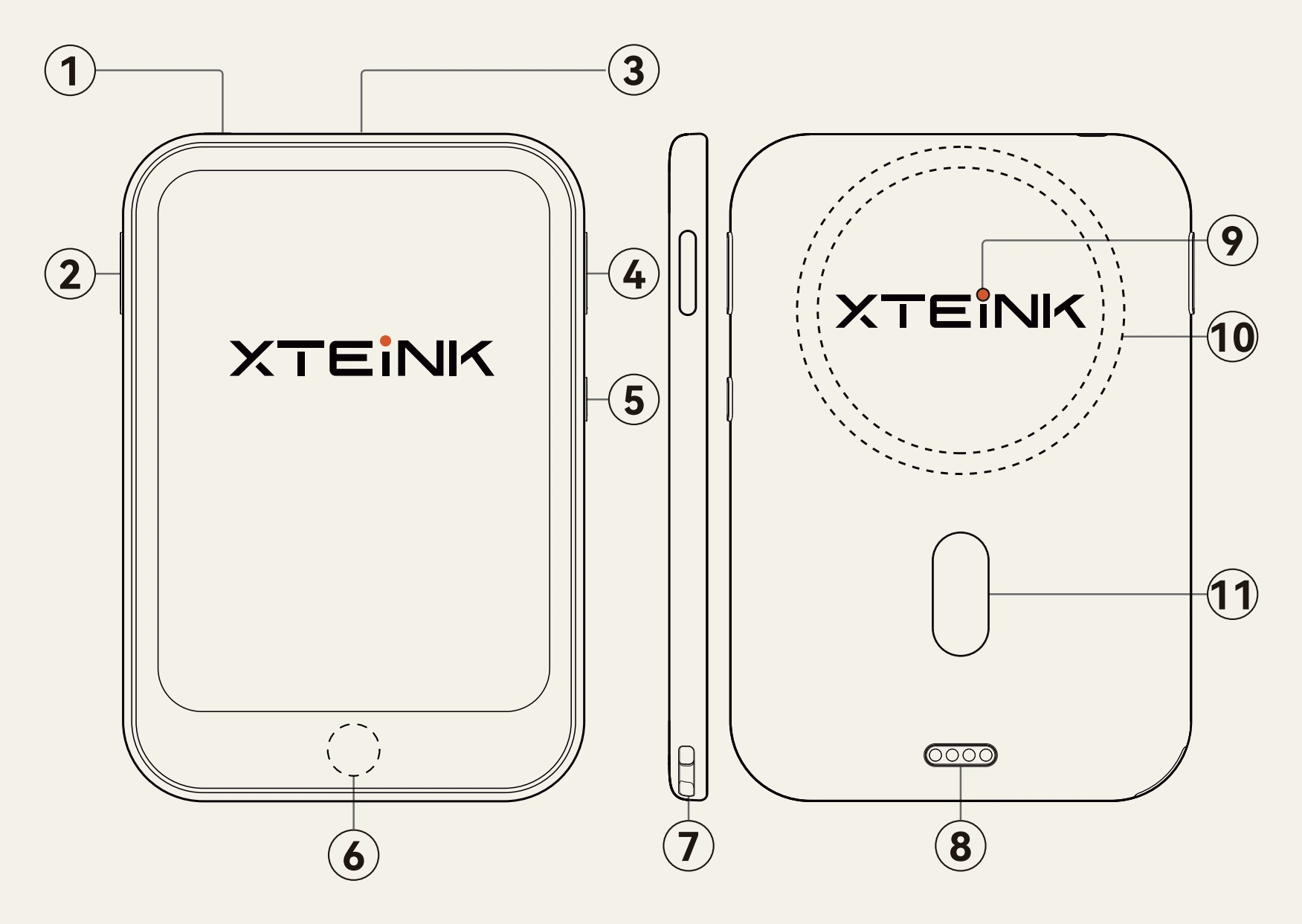
1Reset — top-left corner, recessed
2Previous Page — left edge
3microSD card — top edge
4Next Page — right edge, above the power key
5Power on/off — right edge
6Home button — front, below the screen
7Lanyard hole — bottom edge
8Magnetic charging port — back, four pins
9Charging light — back, red charging and white when full
10Built-in magnet — back, the ring
11Magnetic alignment strip — back, below the ring
Charging: magnetic pins, with a USB-C adapter in the box
The device overview lists a magnetic charging port next to a magnetic alignment strip, with a light that is red while charging and white when full. Rated input is 5 V 0.5 A, and a full charge takes one to two hours. The drawing shows four pogo pins at the bottom of the back and no USB-C socket anywhere on the body. The box makes up for it with a pogo-pin-to-USB-C adapter, so an ordinary USB-C cable still works — through a part that is easy to leave behind.
That is the same trade the X3 and the X4 Pro already make, and it is the single thing owners complain about most in the Xteink threads: a cable you cannot borrow, and a device you cannot charge from the laptop you are sitting at. The adapter is a partial answer, not a port.
The card, and an app that sends wallpapers and fonts
The guide lists a microSD card already in the slot, and four jobs for the XTEINK app:
- wirelessly transfer e-books, comics, wallpapers and fonts;
- sync reading progress to the app and produce periodic reading reports;
- browse a wallpaper community, and a points store.
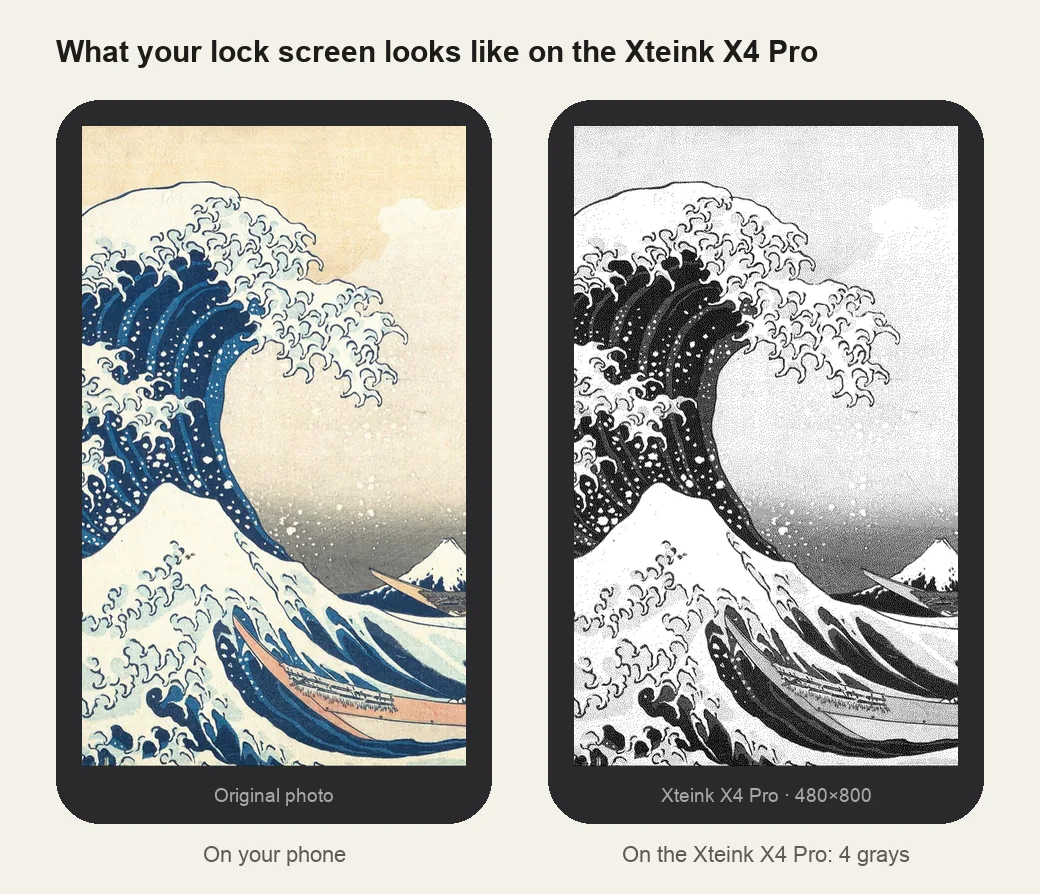
Wallpapers and fonts are file types the device expects to receive, which is the part of this that concerns us. What we cannot do yet is size anything: a wallpaper has to be cut to the panel, the panel is not in the filing, and a picture resized to the wrong rectangle looks worse than the one the reader shipped with.
The radio is 2.4 GHz only, which matches the grant. The guide warns that a phone hotspot needs its compatibility mode on — the same limitation the rest of the Xteink line has.
What the photos suggest — and what they are not
The product shots that started the thread show six shell colours, a body close to the EEGO A4 footprint and slightly thinner, a MagSafe-style ring on the back, and the pogo pins in place of a USB-C socket. Read them as product photography, not as a datasheet: nothing in that set of pictures is in the filing, and the panel, the weight and the battery are not readable from a render.
What nobody knows
- Screen size and resolution. Not stated. Everything from 4.0 to 4.3 inches has been guessed at in the threads, and a guess is all it is.
- A front light. The guide never mentions one, and the parts list that would show an LED driver is confidential. Treat “no light” as likely and unproven.
- Price, date, countries. None of it is public. The last two Xteink launches went from certification to sale in weeks, but that is a pattern, not a schedule.
- Firmware. Nothing says whether CrossPoint or Licorice will run on it, and the chip is a guess that the filing does not confirm. A new panel and a new button layout usually mean a new port of whatever the community runs, which takes months, not days.
- Whether it ships at all. Xteink registered an X4L in 2026 and cancelled it before release. A grant is permission, not a promise.
Should you wait for it?
If you need a reader this month, a filing is not a reason to wait. The Neo, as described in its own manual, is a small magnetic reader with page buttons, a card slot and 2.4 GHz Wi-Fi; the X4 Pro already gives you a 4.3-inch screen, a front light and touch, and it is in stock.
- Want a light for reading in bed: the X4 Pro. The filing does not show the Neo has one.
- Want USB-C without an adapter: the X4 Classic or the original X4.
- Want Android apps: the S4, if you can buy one — it is sold in China.
The number worth watching is the panel size. The day Xteink publishes it, the wallpaper converter can get a Neo profile with the exact pixels, and the size comparison can draw it to scale against the other four. Until then we would be inventing dimensions, which is the one thing a size chart must never do.
Questions people are asking
Has the Xteink Neo been released?
No. As of 11 November 2026 the only public record is an FCC certification granted on 2 November 2026. Xteink has not announced a price, a date or a country list, and an FCC ID does not commit a company to selling anything.
Does the Xteink Neo have a front light?
Nobody knows. The 37-page quick start guide never mentions a front light, and the grantee withheld the schematics, the parts list and the operational description, so there is nothing else to check. Not mentioning one is not the same as not having one.
Does it have physical buttons?
Yes. The quick start guide lists Previous Page, Next Page, Home, Power and a recessed Reset by number, next to a microSD slot, a lanyard hole and a magnetic charging port. It also tells you to tap the More icon to open Settings, so the screen is a touchscreen too.
What screen size does it have?
Not stated anywhere in the filing. The product shots suggest a body close to the EEGO A4, which would put it in the 4.3-inch class, but a body is not a panel. Until Xteink publishes the size, any number you read is a guess.
Can it charge over USB-C?
It charges through four magnetic pogo pins on the back. The drawing in the filing shows no USB-C socket on the body, but the box includes a pogo-pin-to-USB-C adapter, so a USB-C cable still works — through a part that is easy to lose.
Is the Neo the same as the S4?
No. The S4 is the Android 11 reader sold in China with a 4.3-inch screen. The Neo is a separate certification with its own model name, its own manual and 2.4 GHz Wi-Fi only. None of the XTOS firmware or the tools on this site is confirmed to work on either.
Will my X4 Pro wallpaper or case fit the Neo?
No, and not just because the bodies differ. A wallpaper is cut to the panel, and the Neo's panel is unknown; a case is cut to the body and the button and pin positions, which are also unknown. Wait for the published size rather than resizing to fit.
Everything else — what each current model costs to your door, which firmware runs on which chip, and how to get a file onto the card — is in the buying guide and the firmware chooser.