Scanned PDF to XTC
A photographed book in, a book that reads like a bought one out: the scan is read in this tab and set again at the screen's own size, so 9-point print becomes 22-pixel text instead of a picture to squint at. Twenty pages a go, about half a minute each: check one batch, read the next, and the pages you read add up to one book. English printed text only; a book in another language is not read at all.
- Xteink X4, X4 Classic
- 480 × 800
- 4 grays
- .xtch
The preview is the converted page, pixel for pixel.
English printed text only — a Chinese, Japanese or Korean book is not read at all. About 1.6 seconds a page; tables, formulas, handwriting and pictures are not read, and a page with almost no text is kept as a picture.
How to open it on the reader
- CrossPoint or CrossInk: copy the .xtch file to the SD card (any folder) or send it with File Transfer, then open it from the file browser. Chapters are under the reader menu.
- Stock firmware: XTC is Xteink's own book format. Copy the file to the SD card and open it from the file list. We haven't confirmed .xtch and the X3 size on stock yet; if a file won't open, try Black & white (.xtc).
A scan that comes out wrong? Tell us. We read everything.
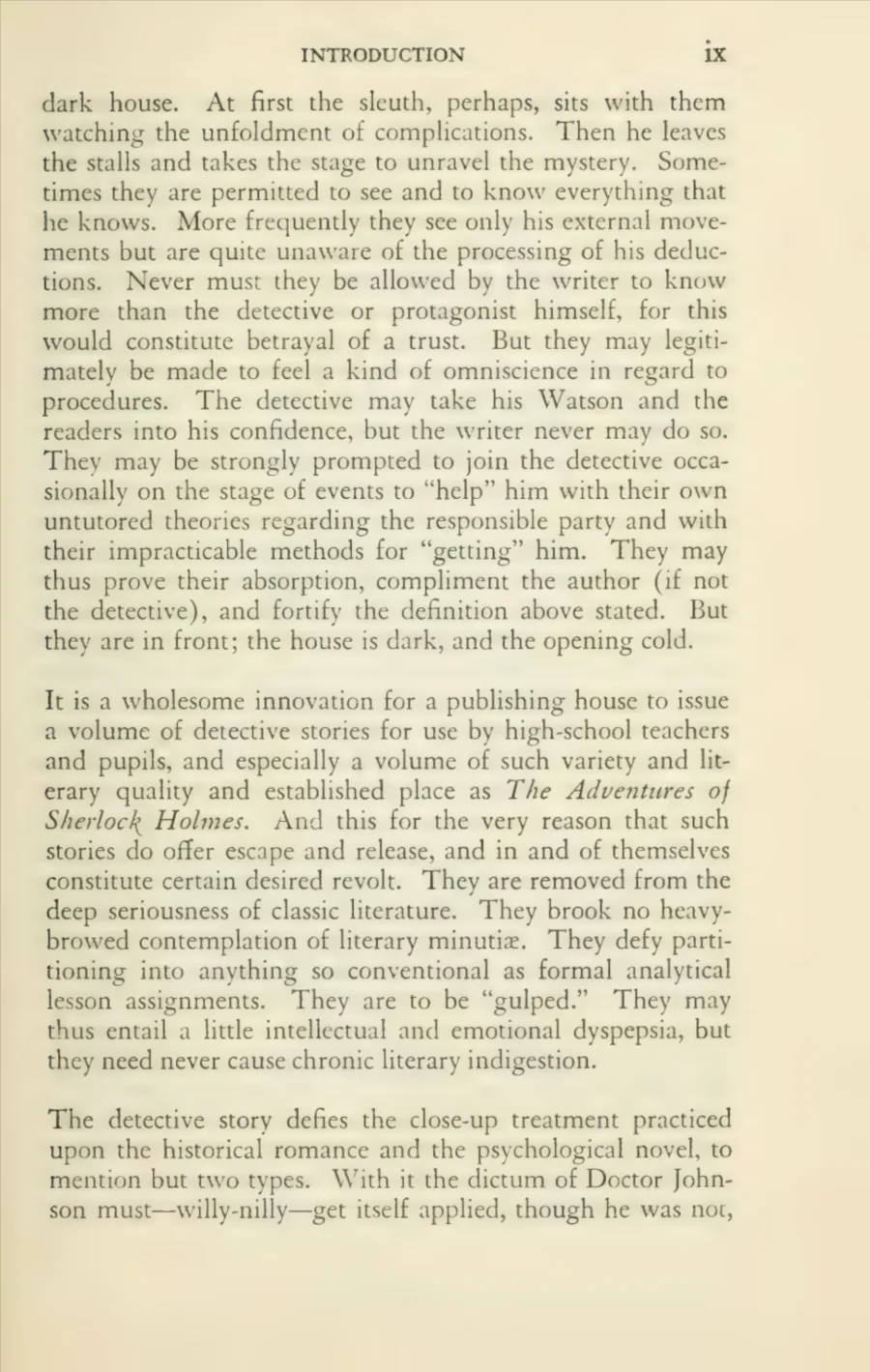
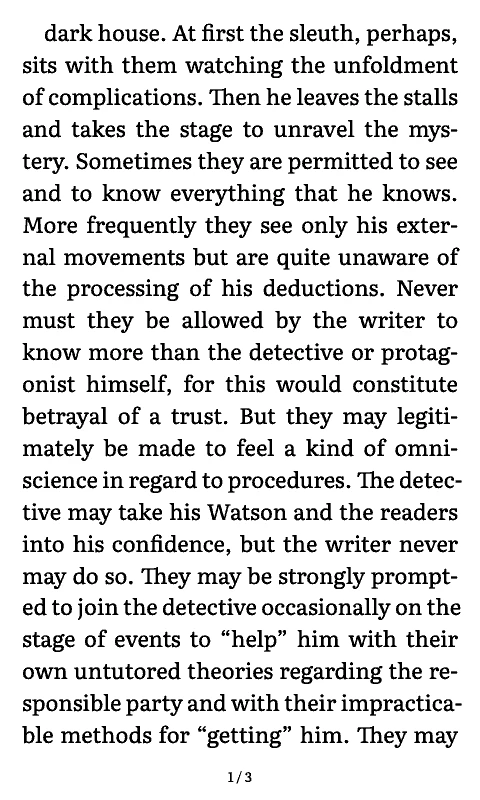
The same page, before and after
Left: a leaf of a 1930 printing, photographed page by page for the Internet Archive — 9-point type, a running head, a folio, and a century of paper. Right: the same leaf, read in the browser and set again at 480 × 800, at 22 pixels. Nothing was re-typed; the words are the ones the engine found.
Idea, not built yet
$3 a book
A whole scanned book, read in one go
The PDF goes to a bigger model on our servers and comes back as text for all 400 pages at once, so nobody has to keep the tab open. This page stays free and stays on your device either way.
What it does to the file
Everything below can be checked against the file you get back.
- The words are re-set, not cropped
- The other converters here keep the page as a picture and fit it to the screen: small print stays small, and a dense page ends up sideways. This one reads the words and lays them out again at your text size. A paragraph that took a third of a printed page becomes two or three screens of comfortable type.
- Two columns are read in order
- A page with a blank gutter down the middle is read down the left column and then the right. Given the whole page at once, engines usually interleave the two into nonsense, so the page is handed over in parts.
- Running heads and page numbers go
- A line that comes back at the top of page after page, or that is nothing but a number, is dropped before paragraphs are joined. Otherwise the title of the book lands in the middle of a sentence, once per page.
- Pictures keep their page
- A page with almost no text on it — a plate, a map, a figure — is kept exactly as it was, dithered like the wallpapers, instead of being guessed at. Those pages you page through as pictures; the rest you read as text.
- Print, English, and nothing else
- The reader is an English model, about 1.6 seconds a page. Tables come out as loose words, formulas as noise, and marginal notes, speckled photocopies and curved book gutters are where it fails; Chinese, Japanese, Korean and accented Latin text it does not read at all, because it has never seen them. If yours is one of those, the picture-by-picture route below is the honest answer.
What the text looks like on the reader
The text is set with the same typesetter as the EPUB converter: whole-paragraph line breaking, hyphenation, justified margins, no single line stranded at the top or bottom of a screen, and text drawn without dither so letters keep clean edges in the panel's four grays. Text size, line spacing, margins, justification, hyphenation and page numbers are all yours to set before you download.
When the picture route is the better one
Poetry, plays, sheet music, cookbooks, legal forms, anything with a table on every other page: the PDF to XTC converter keeps the page exactly as printed, in one screen or in two or three cut between lines. Nothing is misread, because nothing is read. The two tools are the same job done two ways, and the right one depends on whether you want the words or the page.
Questions
›Is my scan uploaded?
No. The PDF is read by pdf.js in this tab, the words by an OCR engine that ships with the page, and the book is written here too. The engine and its English model are downloaded once from this site, about 8 MB, and then work with the network off. Nothing is sent to a server, which is why private and work documents are fine.
›Why does the text not sit where it did on the page?
Because it is text now. Page numbers, running heads, the exact place of a footnote and the width of a line all come from the paper, and a 480-pixel screen cannot honour them. You get the words in reading order at a size you can read; that is the trade, and it is the same one every ebook makes.
›How much text can it read at once?
Twenty pages a go, about half a minute. Every batch is added to the book you are building: read 1–20, look at the pages, then read the next 20, and when you have read as much as you want the download holds all of it as one file. A batch you stop keeps the pages it had finished. A 376-page book is nineteen rounds on a laptop and three to four times slower on a phone; “Read the rest” does the remaining pages in one go if you are happy to wait.
›Does it read books in other languages?
No. The engine here is an English model: Chinese, Japanese, Korean, Cyrillic and heavily accented Latin text come out as noise, and the page is kept as a picture instead. You find out in the first second — if the first page with text on it reads below 45% confidence the reader stops and says so, rather than turning the rest of the book into pictures. The PDF to XTC converter keeps a page in any language as a picture on purpose.
›Does it keep the chapters?
A scanned PDF has no bookmarks, so headings are found in the text itself: a line set larger than the body, all in capitals, or starting with Chapter, Part or Book. What it finds becomes the reader's chapter menu. A novel with plain unnumbered breaks may end up with no menu at all.
›Will it read an old, speckled scan?
Sometimes. Clean 300 dpi scans of printed books read well. Yellowed paper, show-through from the reverse side, heavy grain, tight gutters and pages photographed askew are where the errors come in: a wrong letter here, a broken word there, an occasional line dropped. Nothing is invented — if the engine cannot see it, it is not there — but a bad scan reads like a bad proof.
›What about tables, formulas and pictures?
Tables come out as a run of loose words and formulas as punctuation soup; both are better kept as pictures. Pages with almost no text are kept as pictures automatically, and the rest you can convert with the PDF to XTC converter as images if the text version disappoints.
›Is it free?
Yes, with no sign-up and no page limit. The reading engine is open source (tesseract.js, Apache-2.0) and the English model is trained data from the same project.
Next
- PDF to XTC, page by page the same PDF kept as pictures: exact layout, no reading, no mistakes
- EPUB to XTC if the book already exists as text, skip the scan entirely
- Xteink wallpaper converter the cover of your scan as a sleep screen